
How to Build an AI-Supported Teaching Workflow in 2026
January is a natural moment for teachers to take stock—examining what’s working well and what is draining energy. It’s a time to reflect, reset, and think intentionally about how the rest of the year will unfold.
When it comes to AI, that distinction matters.
Much of the conversation around AI in education still gets framed in extremes. On one end, there’s fear that using AI means being “lazy” or cutting corners. On the other, there’s pressure to use it everywhere, all at once. Neither reflects the reality of good teaching.
Using AI well does not mean handing over the work entirely. And it certainly doesn’t mean handing over professional judgment. Instead, developing an AI-supported teaching workflow is about using AI intentionally to protect teacher time and energy.
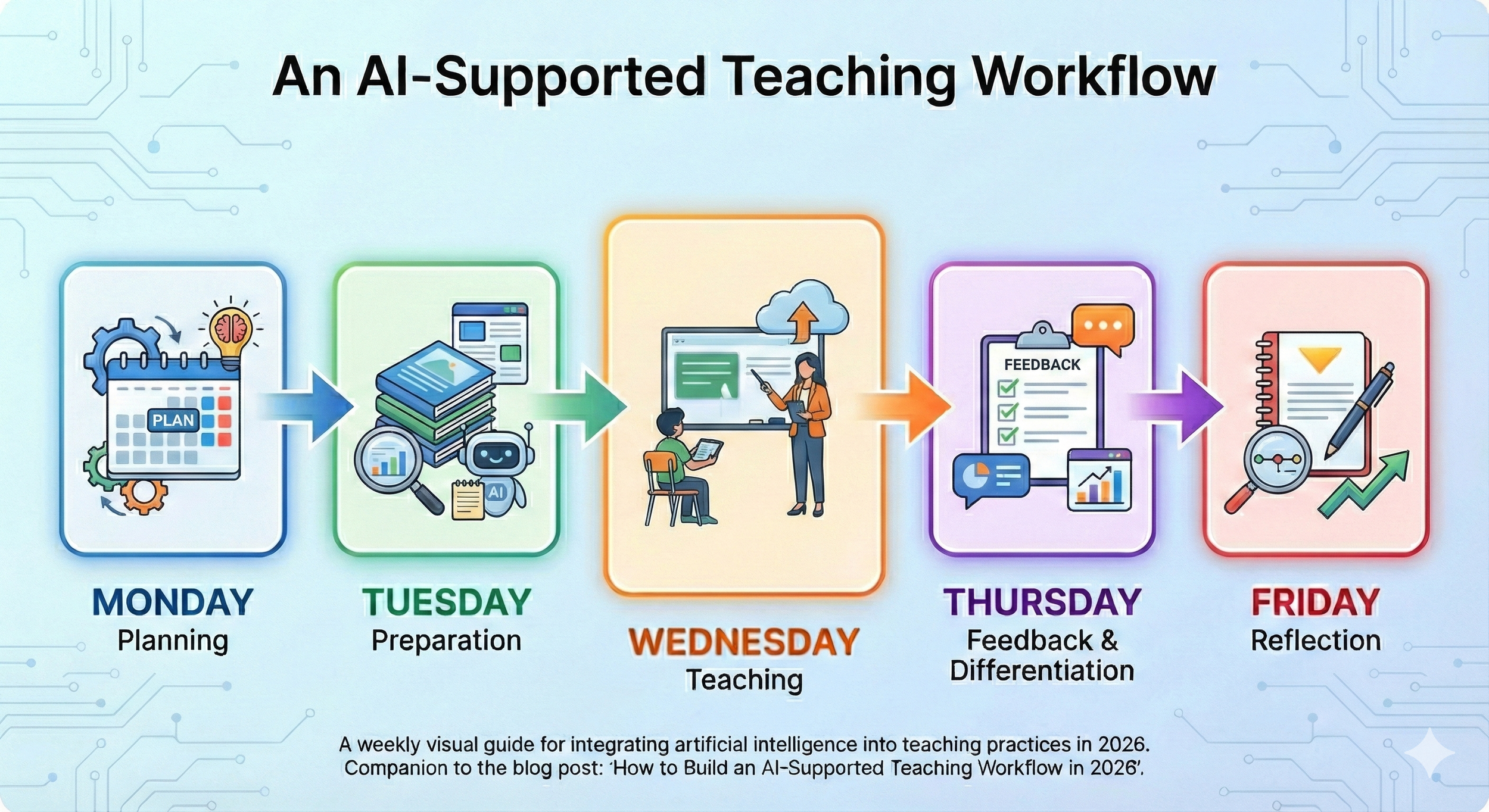
A typical teaching workflow starts with planning and preparation, then moves to instruction, feedback, differentiation, and reflection.
In an AI-supported teaching workflow, technology can assist at specific points:
planning lessons
preparing materials
differentiating instruction
providing feedback
reflecting and resetting for the next week
What remains firmly human are the parts that matter most: instructional decisions, responsiveness in the moment, and relationships with students.
The goal isn’t to overhaul how teachers work. It’s to reduce friction in the parts of the job that quietly drain time and energy—so teaching itself can remain the focus.
That distinction—between support and replacement—is easier to understand when you see actual examples of where AI can assist teachers with their work. Here’s how an AI-supported teaching workflow might look across a typical week.
Monday: Planning with Clarity
It’s Monday morning. Your plan book is blank, you have a thousand tabs open in search of a lesson idea, and time is running out. Every teacher has felt that moment of pressure at one point or another—and it’s a natural place to begin integrating AI into your workflow.
When planning lessons, teachers are doing complex cognitive work: clarifying learning objectives, sequencing instruction in a meaningful way, and anticipating where students may struggle. AI can support each of these steps—especially when time is tight.
When you provide an AI tool with the standards or learning objectives you want to focus on, it can quickly generate a draft lesson plan. It can also suggest instructional sequences that help students build understanding over time and surface likely misconceptions or trouble spots to watch for during instruction. This doesn’t replace teacher thinking; it accelerates the planning process so you can spend your energy refining the plans and making instructional decisions that suit the needs of your class.
Here’s one example of a prompt you might use to support lesson planning:
“Create a lesson for a [grade level and subject] class. The class period is [number of minutes] long. The objective of this lesson is: [objective and/or standard]. After drafting the lesson plan, identify three misconceptions students might have and suggest ways I can address them.”
As with any AI output, your professional judgment remains essential. Review the lesson carefully to ensure it aligns with your goals, reflects your instructional style, and is appropriate for your students. Check for accuracy, clarity, and bias. If the draft isn’t quite right—and it often won’t be—iterate. Provide feedback, clarify constraints, and ask the tool to revise. Iteration isn’t a failure of the tool; it’s a core part of using AI well. But this is where your expertise matters most—knowing which suggestions fit your students.
Tuesday: Preparation (The Materials Crunch)
Now you have a functional lesson plan. But for it to work in a real classroom, it needs to be turned into usable materials—slides, readings, handouts, activities, and supports. This is often where strong planning breaks down, not because the lesson isn’t solid, but because creating everything takes more time than you have.
This is another moment where AI can lighten the load.
By pasting your lesson plan into an AI tool and asking it to generate draft materials—such as a slide deck, a reading passage, or a notecatcher—you can move from plan to preparation much more efficiently. If your lesson includes a reading passage, AI can also help create versions at different reading levels or translate materials into additional languages, giving you a stronger starting point for differentiation.
Here’s an example of a simple materials-prep prompt:
“Using the lesson plan pasted below, create a [slide deck, reading passage, notecatcher, etc.]. Be sure to include [specific features or supports you need].”
Within seconds, you have draft materials you can review, revise, and adapt. The value here isn’t speed alone—it’s that good instructional decisions made during planning actually make it into the classroom. When preparation takes less time, teachers are better positioned to focus on students rather than creating materials.
Wednesday: Teaching & Adjusting in Real Time
With a standards-aligned lesson in place and materials ready, it’s time to teach. This is work that can’t be automated. As the classroom teacher, you are constantly reading the room: noticing where students are engaged, where confusion is emerging, and when it’s time to slow down, rephrase, or move on.
These in-the-moment decisions rely on professional judgment, relationships, and deep knowledge of your students. AI doesn’t—and shouldn’t—replace this part of teaching.
But there's a relationship between Monday's planning and Wednesday's presence. When you're not mentally juggling which slide to create next or whether you have enough copies, you can actually notice that Marcus is withdrawing or that three students are stuck on the same concept. Lighter preparation doesn't make you a better teacher—but it protects the mental space that teaching well requires.
AI doesn’t teach the lesson. It protects the conditions that allow you to teach well.
Thursday: Differentiation & Feedback
Students have completed the lesson, and now their work needs attention. Timely, meaningful feedback plays a critical role in learning—but providing it across dozens of responses can quickly become overwhelming.
This is another moment where AI can support teachers without replacing professional judgment. How you use it will depend on your context and comfort level. Some teachers invite students to use AI-generated feedback during a drafting phase, allowing them to revise before submitting final work for teacher review. Others prefer to keep AI as a behind-the-scenes tool only, using it to generate a bank of feedback starters or comments they can draw from as they review student work. Both approaches can work—what matters is that you remain the decision-maker.
As you review student work, patterns often emerge. Some students need additional support or reteaching, while others are ready to extend their thinking. This kind of responsive differentiation is powerful—but it’s also time-intensive, which is why it so often falls to the bottom of the list.
AI can help reduce that barrier by quickly generating reteaching activities, scaffolds, or extensions aligned to the lesson. With a solid starting point in place, teachers can spend their time refining and facilitating rather than creating everything from scratch.
Here’s an example of a prompt that can support this work:
“My [grade level] students just completed a lesson on [topic]. Create a 15-minute reteaching activity for students who need additional support and a 15-minute independent extension activity for students who are ready to move forward.”
Friday: Reflection & Reset
It’s Friday. Students have completed their work, feedback has been given, and the week is coming to a close. To get the most out of all that effort, it’s important to pause—if only briefly—to reflect. Noticing patterns, naming what worked, and identifying what needs adjustment are what allow good teaching to compound over time.
This is also the part of the week that often gets skipped. By Friday afternoon, energy is low, and reflection feels like something to save for later.
AI can support this work by offering simple reflective prompts or helping organize notes and observations from the week. For instance, you might ask: “Based on these observations from my week [paste notes], what patterns do you notice? What should I prioritize adjusting next week?” It can also help translate those reflections into early ideas for the following week’s planning, making Monday feel more manageable before it even begins.
Used this way, reflection becomes less of an extra task and more of a reset—one that supports growth in your teaching practice without extending your workday.
What This Looks Like in Practice
Seeing an AI-supported teaching workflow laid out across a week can sound structured—even ideal. In reality, though, most teachers don’t adopt new practices all at once. They start small, test what works, and adjust over time.
Consider this example: Sarah, a middle school ELA teacher, took the “start small” approach. She began by using AI only on Mondays to help draft lesson outlines aligned to her standards. That one shift made planning feel lighter, but she didn’t change anything else right away.
After a few weeks, she noticed that feedback was still her biggest bottleneck. On Thursdays, she began using AI to generate feedback starters and draft reteaching and extension activities. Those supports helped her respond to student work more efficiently while still keeping her expectations and voice intact.
By mid-February, Sarah was saving roughly two hours each week. She didn’t use that time to add more tasks. Instead, she redirected it toward small-group conferences, planning a bit further ahead, and leaving school with less to finish later.
Her workflow didn’t become perfect—but it became more sustainable. And that sustainability made consistency possible.
You don’t need to be “good at AI” to build an AI-supported teaching workflow. You don’t need to master new tools or redesign your entire week. And you don’t need to do everything at once.
What matters most is starting in one place—maybe it’s planning, maybe it’s feedback—where the work already feels heavy. Let AI support that moment, notice what changes, and decide what to keep.
An effective workflow isn’t about speed or perfection. It’s about creating conditions that protect your time, energy, and professional judgment so you can focus on what matters most: your students and their learning.
If this post sparked even a small sense of curiosity, let that be enough to begin.