Lauren Schultz Lauren Schultz

How to Build an AI-Supported Teaching Workflow in 2026

In 2026, using AI well isn’t about doing less or handing work to a tool—it’s about building intentional workflows that protect teachers’ time, energy, and professional judgment. This post walks through what an AI-supported teaching week can actually look like in practice.
January is a natural moment for teachers to take stock—examining what’s working well and what is draining energy. It’s a time to reflect, reset, and think intentionally about how the rest of the year will unfold.

When it comes to AI, that distinction matters.

Much of the conversation around AI in education still gets framed in extremes. On one end, there’s fear that using AI means being “lazy” or cutting corners. On the other, there’s pressure to use it everywhere, all at once. Neither reflects the reality of good teaching.

Using AI well does not mean handing over the work entirely. And it certainly doesn’t mean handing over professional judgment. Instead, developing an AI-supported teaching workflow is about using AI intentionally to protect teacher time and energy. 

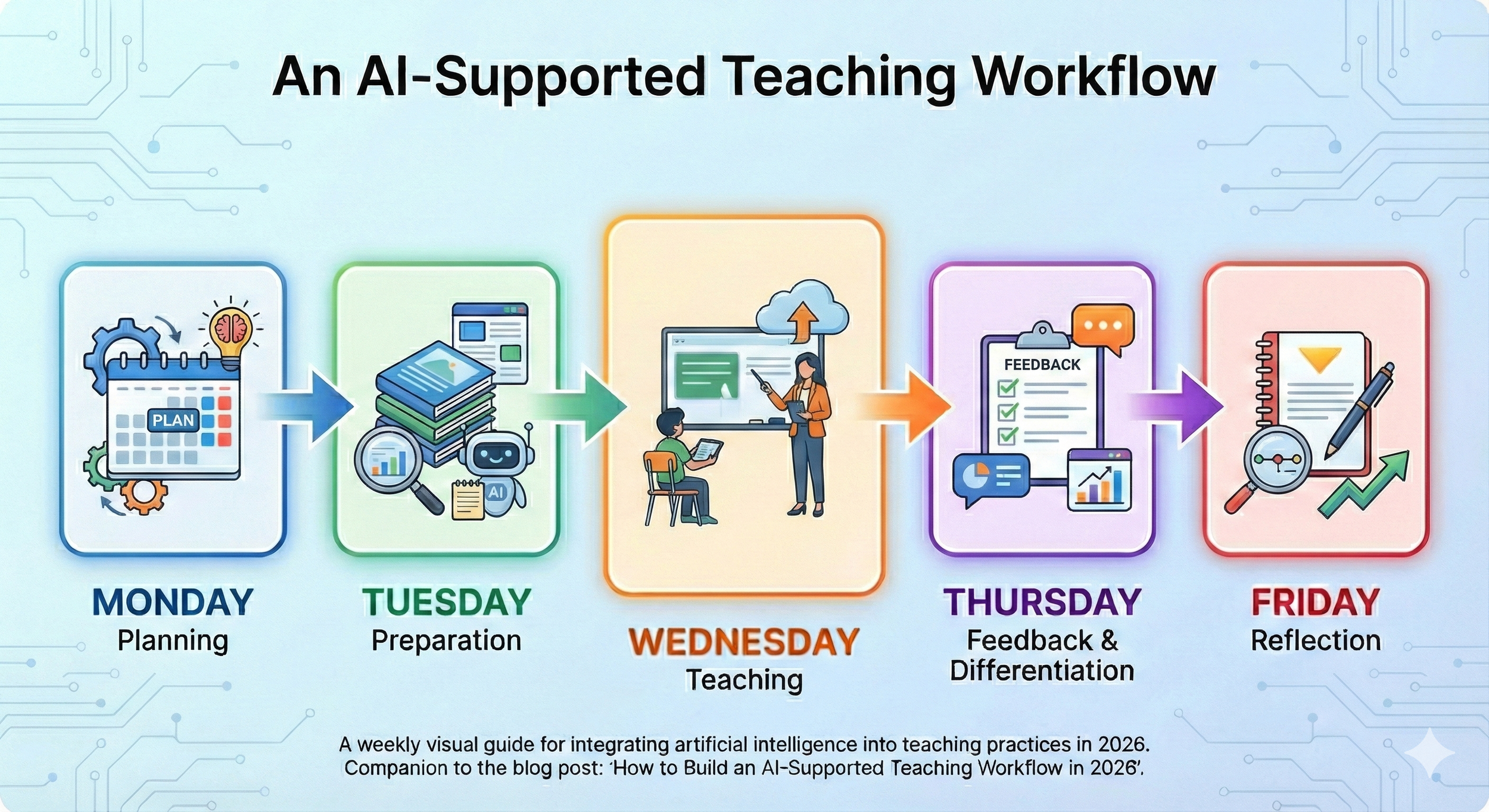
A typical teaching workflow starts with planning and preparation, then moves to instruction, feedback, differentiation, and reflection. 

In an AI-supported teaching workflow, technology can assist at specific points:

  • planning lessons

  • preparing materials

  • differentiating instruction

  • providing feedback

  • reflecting and resetting for the next week

What remains firmly human are the parts that matter most: instructional decisions, responsiveness in the moment, and relationships with students.

The goal isn’t to overhaul how teachers work. It’s to reduce friction in the parts of the job that quietly drain time and energy—so teaching itself can remain the focus.

That distinction—between support and replacement—is easier to understand when you see actual examples of where AI can assist teachers with their work. Here’s how an AI-supported teaching workflow might look across a typical week.


Monday: Planning with Clarity

It’s Monday morning. Your plan book is blank, you have a thousand tabs open in search of a lesson idea, and time is running out. Every teacher has felt that moment of pressure at one point or another—and it’s a natural place to begin integrating AI into your workflow.

When planning lessons, teachers are doing complex cognitive work: clarifying learning objectives, sequencing instruction in a meaningful way, and anticipating where students may struggle. AI can support each of these steps—especially when time is tight.

When you provide an AI tool with the standards or learning objectives you want to focus on, it can quickly generate a draft lesson plan. It can also suggest instructional sequences that help students build understanding over time and surface likely misconceptions or trouble spots to watch for during instruction. This doesn’t replace teacher thinking; it accelerates the planning process so you can spend your energy refining the plans and making instructional decisions that suit the needs of your class.

Here’s one example of a prompt you might use to support lesson planning:

“Create a lesson for a [grade level and subject] class. The class period is [number of minutes] long. The objective of this lesson is: [objective and/or standard]. After drafting the lesson plan, identify three misconceptions students might have and suggest ways I can address them.”

As with any AI output, your professional judgment remains essential. Review the lesson carefully to ensure it aligns with your goals, reflects your instructional style, and is appropriate for your students. Check for accuracy, clarity, and bias. If the draft isn’t quite right—and it often won’t be—iterate. Provide feedback, clarify constraints, and ask the tool to revise. Iteration isn’t a failure of the tool; it’s a core part of using AI well. But this is where your expertise matters most—knowing which suggestions fit your students.

Tuesday: Preparation (The Materials Crunch)

Now you have a functional lesson plan. But for it to work in a real classroom, it needs to be turned into usable materials—slides, readings, handouts, activities, and supports. This is often where strong planning breaks down, not because the lesson isn’t solid, but because creating everything takes more time than you have.

This is another moment where AI can lighten the load.

By pasting your lesson plan into an AI tool and asking it to generate draft materials—such as a slide deck, a reading passage, or a notecatcher—you can move from plan to preparation much more efficiently. If your lesson includes a reading passage, AI can also help create versions at different reading levels or translate materials into additional languages, giving you a stronger starting point for differentiation.

Here’s an example of a simple materials-prep prompt:

“Using the lesson plan pasted below, create a [slide deck, reading passage, notecatcher, etc.]. Be sure to include [specific features or supports you need].”

Within seconds, you have draft materials you can review, revise, and adapt. The value here isn’t speed alone—it’s that good instructional decisions made during planning actually make it into the classroom. When preparation takes less time, teachers are better positioned to focus on students rather than creating materials.

Wednesday: Teaching & Adjusting in Real Time

With a standards-aligned lesson in place and materials ready, it’s time to teach. This is work that can’t be automated. As the classroom teacher, you are constantly reading the room: noticing where students are engaged, where confusion is emerging, and when it’s time to slow down, rephrase, or move on.

These in-the-moment decisions rely on professional judgment, relationships, and deep knowledge of your students. AI doesn’t—and shouldn’t—replace this part of teaching.

But there's a relationship between Monday's planning and Wednesday's presence. When you're not mentally juggling which slide to create next or whether you have enough copies, you can actually notice that Marcus is withdrawing or that three students are stuck on the same concept. Lighter preparation doesn't make you a better teacher—but it protects the mental space that teaching well requires.

AI doesn’t teach the lesson. It protects the conditions that allow you to teach well.

Thursday: Differentiation & Feedback

Students have completed the lesson, and now their work needs attention. Timely, meaningful feedback plays a critical role in learning—but providing it across dozens of responses can quickly become overwhelming.

This is another moment where AI can support teachers without replacing professional judgment. How you use it will depend on your context and comfort level. Some teachers invite students to use AI-generated feedback during a drafting phase, allowing them to revise before submitting final work for teacher review. Others prefer to keep AI as a behind-the-scenes tool only, using it to generate a bank of feedback starters or comments they can draw from as they review student work. Both approaches can work—what matters is that you remain the decision-maker.

As you review student work, patterns often emerge. Some students need additional support or reteaching, while others are ready to extend their thinking. This kind of responsive differentiation is powerful—but it’s also time-intensive, which is why it so often falls to the bottom of the list.

AI can help reduce that barrier by quickly generating reteaching activities, scaffolds, or extensions aligned to the lesson. With a solid starting point in place, teachers can spend their time refining and facilitating rather than creating everything from scratch.

Here’s an example of a prompt that can support this work:

“My [grade level] students just completed a lesson on [topic]. Create a 15-minute reteaching activity for students who need additional support and a 15-minute independent extension activity for students who are ready to move forward.”

Friday: Reflection & Reset

It’s Friday. Students have completed their work, feedback has been given, and the week is coming to a close. To get the most out of all that effort, it’s important to pause—if only briefly—to reflect. Noticing patterns, naming what worked, and identifying what needs adjustment are what allow good teaching to compound over time.

This is also the part of the week that often gets skipped. By Friday afternoon, energy is low, and reflection feels like something to save for later.

AI can support this work by offering simple reflective prompts or helping organize notes and observations from the week. For instance, you might ask: “Based on these observations from my week [paste notes], what patterns do you notice? What should I prioritize adjusting next week?” It can also help translate those reflections into early ideas for the following week’s planning, making Monday feel more manageable before it even begins.

Used this way, reflection becomes less of an extra task and more of a reset—one that supports growth in your teaching practice without extending your workday.


What This Looks Like in Practice

Seeing an AI-supported teaching workflow laid out across a week can sound structured—even ideal. In reality, though, most teachers don’t adopt new practices all at once. They start small, test what works, and adjust over time.

Consider this example: Sarah, a middle school ELA teacher, took the “start small” approach. She began by using AI only on Mondays to help draft lesson outlines aligned to her standards. That one shift made planning feel lighter, but she didn’t change anything else right away.

After a few weeks, she noticed that feedback was still her biggest bottleneck. On Thursdays, she began using AI to generate feedback starters and draft reteaching and extension activities. Those supports helped her respond to student work more efficiently while still keeping her expectations and voice intact.

By mid-February, Sarah was saving roughly two hours each week. She didn’t use that time to add more tasks. Instead, she redirected it toward small-group conferences, planning a bit further ahead, and leaving school with less to finish later.

Her workflow didn’t become perfect—but it became more sustainable. And that sustainability made consistency possible.


You don’t need to be “good at AI” to build an AI-supported teaching workflow. You don’t need to master new tools or redesign your entire week. And you don’t need to do everything at once.

What matters most is starting in one place—maybe it’s planning, maybe it’s feedback—where the work already feels heavy. Let AI support that moment, notice what changes, and decide what to keep.

An effective workflow isn’t about speed or perfection. It’s about creating conditions that protect your time, energy, and professional judgment so you can focus on what matters most: your students and their learning.

If this post sparked even a small sense of curiosity, let that be enough to begin.

Read More
Lauren Schultz Lauren Schultz

The AI-in-Education Year-in-Review: 5 Lessons We Learned in 2025

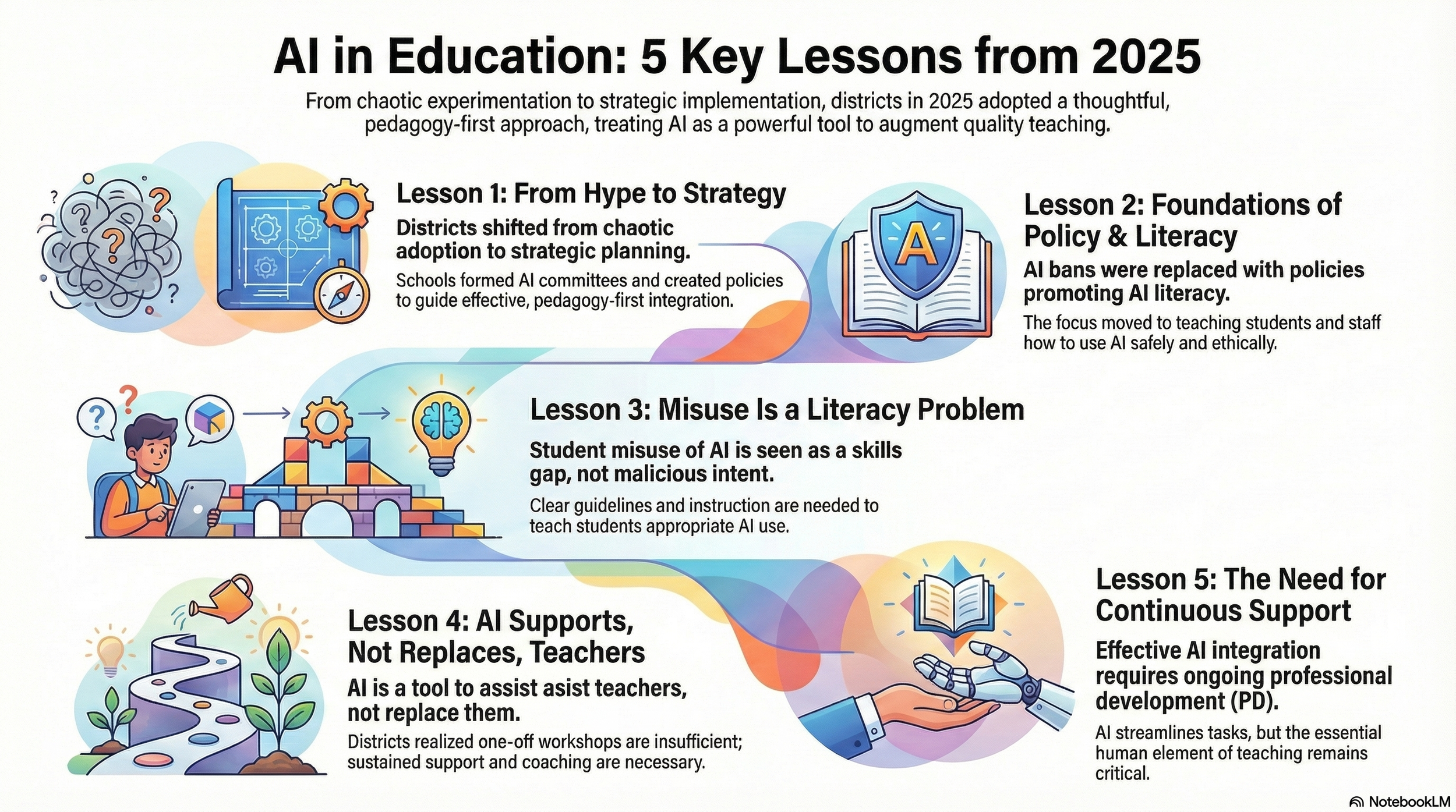
2025 was the year AI in education moved from hype to strategy. Districts shifted from experimentation to intentional planning—building policies, AI literacy, and professional learning structures that actually support teachers and students. These five lessons reveal where we’ve been—and what schools must prioritize next.

Infographic summarizing five key lessons from AI in education in 2025, including AI strategy, policies, AI literacy, teacher support, and continuous professional development.

Five lessons from 2025 that show how AI in education moved from hype to strategy — and what districts should carry forward into 2026.

If 2023 was the year artificial intelligence (AI) arrived in schools, and 2024 was the year everyone tried it, 2025 was the year education finally got serious about using it well. AI seems to be changing daily, and it can be hard to keep up with. Still, this year was all about teachers, tech directors, and district administrators finding ways to incorporate AI safely and effectively into their schools and classrooms. These 5 lessons show how far we’ve come in 2025 and help us plan for 2026.

Lesson 1: AI Moved from Hype to Strategy

Early AI adoption was a lot like the Wild West–everyone was just doing whatever they wanted, with whatever tools they chose to use. It was chaos! In 2025, districts started to get smart about their AI usage, asking questions like, “Where does AI fit?” and “What problems does it solve?” 

Many districts around the country formed AI committees and working groups. They had conversations with stakeholders. They created policies and strategic plans. They put pedagogy first, then figured out ways to augment that with AI. (Check out the great work being done by the Ottawa Catholic School Board and Buffalo Public Schools!)

AI is no longer just a “cool” fad.

Lesson 2: Districts Began Building the Foundations—Policies & AI Literacy

“We just ban all use of AI.” A common statement in 2024, but no longer acceptable in 2025. Bans don’t work, and they don’t allow teachers and students to develop the tremendously important skill of AI literacy. 

Digital Promise defines AI literacy as: “The knowledge and skills that enable humans to critically understand, evaluate, and use AI systems and tools to safely and ethically participate in an increasingly digital world.” Our students will face a world filled with AI tools–they must be empowered to thrive in this environment. Teachers can only guide their students in this learning journey if they are also AI literate.

To this end, districts started to consider how to best incorporate AI tools into their ecosystems. AI policies that have been developed outline expectations for teachers and students, allowing them to be informed users of AI. Data privacy and proper vetting of tools were critical elements this year as districts moved forward with AI usage.

As districts focused on building AI literacy and thoughtful policies, another realization quickly emerged: the real challenges weren’t about the tools themselves, but about how students understood and used them.

Lesson 3: “Student Misuse” Isn’t an AI Problem—It’s a Literacy Problem

A lot of early talk about AI involved how students would use AI to cheat or avoid tasks that involve deep thinking–the same concerns that were raised when calculators were made widely available and when students could look things up on Google. 

While academic dishonesty and cognitive offloading are concerns, the underlying problem is that students need to develop AI literacy skills. Students generally want to learn and want to do the right thing. AI misuse, then, is often due to a lack of skills, not malicious intent. 

To support students, districts need clear guidelines about when AI use is appropriate and when it is not. In class, teachers should help students learn how AI works, ways AI can support their thinking and learning, and how to evaluate outputs for accuracy and bias. (Does this sound like too much for teachers? This webinar from Lindy Hockenbary demonstrates that AI literacy can easily be incorporated into instruction, without adding more onto teachers’ already full plates.)

Helping students use AI responsibly was only part of the story. The next challenge was addressing a broader concern: what AI meant for the role of teachers themselves.

Lesson 4: AI Supported, Not Replaced, High-Quality Teaching

One of the early fears swirling around in the AI-in-education space was that AI had the potential to replace teachers. As schools and districts started to take a more measured approach to AI integration in 2025, it became clear that teachers aren’t going anywhere! AI is a tool, like a hammer - useful in some situations, but not a replacement. 

AI can help teachers with all sorts of things. It can write lesson plans, provide feedback, and differentiate materials. It can streamline a teacher’s administrative tasks to give them the precious gift of time.

But AI can’t read a student’s body language and recognize that they are having a bad day. AI can’t create relationships with students (not real ones, anyway!). AI can’t inspire students the way a great teacher can. The human element is critical to education, so there will always be a need for excellent educators.

To extend the hammer analogy, a good carpenter knows when it is appropriate to use a hammer. He also knows that a hammer isn’t the right tool when he wants to tighten a screw. Likewise, AI is appropriate to use in some situations, but other tools are better suited in other situations. A successful teacher in the age of AI will know the difference and be able to use AI well when it supports instruction.

AI will never replace teachers, but teachers who are able to use AI well will replace those who can’t. Which brings us to Lesson 5…

Lesson 5: The Need for Continuous PD Became Obvious

AI is a powerful tool. It’s also ever-evolving. In 2025, districts started to realize that one-off workshops were helpful, but not enough. Teachers walked out of introductory sessions excited about what AI could do, but unsure how to turn those ideas into day-to-day practice. With already overwhelming workloads, very few have the time or mental space to experiment on their own—and without follow-up, there’s no opportunity to ask questions, get feedback, or troubleshoot. 

Again and again, educators expressed a need for structured support: practical examples tied to their grade level or subject area, time to practice, and opportunities to revisit the work once they had tried AI with students. District leaders echoed the same reality in their planning conversations throughout the year: We need a clear plan for how we can support teachers.

That shift in mindset is the real story. 2025 was the year districts realized that AI integration isn’t about a single workshop—it’s about building sustained capacity. And with AI tools evolving so quickly, ongoing PD cycles, coaching, and embedded support aren’t “nice to have” anymore. They’re becoming the foundation for safe, meaningful, and equitable use.

As teachers began building that capacity, one thing became clear: the tools they use matter. 2025 brought countless new options, but only a handful genuinely supported teacher workflow and student learning.

Bonus Lesson: A Few Tools Truly Delivered

In 2025, teachers were bombarded with AI tools–a handful demonstrated real staying power. Here are four that are game-changing for teaching and learning:

  • Brisk Teaching — Brisk Teaching is the multi-purpose tool of AI in education. It can be used to create literally any instructional material for the classroom (from scratch or from existing documents, websites, or YouTube videos), provide feedback to students, change the language or reading level of a text, and so much more!

  • Snorkl — Snorkl burst onto the scene as a fantastic option for providing instant feedback to students on a variety of inputs (voice recording, whiteboard drawings, typed text). Students respond to a question in the way they feel comfortable, they receive instant feedback, and they are offered the opportunity to try again and improve their work.

  • Canva — Canva was already a powerful tool in education. With the addition of the AI image generator and Canva Code, the possibilities are nearly endless. Educators can create interactive online learning experiences for students without needing to know how to code.

  • NotebookLM — NotebookLM is an AI-powered tool that just keeps getting better. Users (teachers or students) can input documents into a notebook, such as all of the materials for a science unit. Then, the user can do all sorts of things like ask questions about the material, create a podcast or video summary, make flashcards relevant to the information, or, in a recent addition, create infographics based on the text. All of the answers or outputs are based on the provided documents. This makes NotebookLM a powerful study tool.

Where We Go in 2026

2025 laid the foundations—strategically, ethically, instructionally.

2026 needs to be the year of: 

  • deeper AI literacy for students and teachers

  • expanded student use

  • stronger PD structures

  • equity-driven implementation

  • and alignment with district goals

We’ve moved past hype. We’re ready for purpose. So the question now isn't whether your district will integrate AI in 2026—it's whether you'll do it thoughtfully or reactively.

If your district would like to approach AI integration thoughtfully in 2026, I’d love to collaborate. I’m supporting districts with policy development, AI literacy, and practical PD structures—reach out if you’d like to explore what that could look like for your team.

Read More